發表文章

XAMPP 安裝 ImageMagick (Windows系統)

#Steps to Install Download and Install ImageMagick  http://imagemagick.org/script/binary-releases.php#windows Visit ImageMagic installation directory and module/coders copy all files and past on D:\xampp\apache\bin Download Binary  https://pecl.php.net/package/imagick/3.4.0RC5/windows  php 5.6 TS one according to phpinfo Architecture if it is x86/x64 Exatract and copy php_imagick.dll to D:\xampp\php\ext Add php_imagick.dll on php.ini Copy 8 CORE_*.dll to D:\xampp\apache\bin Restart Apache done and visit phpinfo 參考來源 https://gist.github.com/tojibon/326d1df3d9a260fc3bdf

bootstrap modal 中使用CKEditor,發生Image Dialog無法輸入的狀況

最近重寫html 編輯模組 這次修改將textarea放入Model Dialog中 並套用CKEditor 但神奇的是,畫面沒有問題,而所有的input都無法輸入 原來將modal dialog中的tabindex移除就可以了 參考來源 http://stackoverflow.com/a/27790576

php.ini 的位置

圖片
今天在用php 執行phinx的時候,發現沒有指定 timezone 會有問題 因為是用PHP CLI執行,跟Web的php.ini位置不一樣 Goolge 了一下發現用 php --ini 馬上就會找到位置

DLINK DIR-859 FTP 斷線問題

最近向中華電信申請了IPv6,並將AP換成DLINK DIR-859 是為了支援IPv6與1G區網 使用上很正常,但發現FTP有時會突然斷線,馬上又好了 原以為是NAT設定的問提,重新設定了好幾次後都一樣 於是將問題回覆給客服 http://www.dlinktw.com.tw/techsupport/search.aspx 早上寫信,很快的下午就得到了回覆 原因應該是韌體問題,信件中附上1.5韌體下載網址,下載後發現是1.5 beta2版本 http://www.dlinktw.com.tw/techsupport/download.ashx?file=3496 信件中另附上更新韌體方式 http://www.dlinktw.com.tw/techsupport/FAQView.aspx?f=jokiTFL3L1S1dVxB86NyWw%3d%3d 更新後果然問題就解決了!

STS/Eclipse中,Deploy專案到Tomcat變更預設URL路徑

有的時候複製舊的專案後會變更專案名稱,例如server_a --> server_b 發佈到Tomcat測試的時候路徑仍然會是server_a 解法是到  .settings/org.eclipse.wst.common.component 裡面去變更 server_b "> ......

Android Studio 或其他JAVA Base IDE無法輸入中文問題!?

從之前使用了Android Studio後發現中文都無法輸入 期間也找了、試過很多的方法 今天Google一下仔細看有人是因為安裝的外部輸入法導致此問題發生 想到之前老婆因為要用無蝦米所以有安裝無蝦米,應該也算是外部輸入法吧 將輸入法移除後竟然就可以用了,終於~~~

*** Terminating app due to uncaught exception 'NSInternalInconsistencyException', reason: 'Only RGBA or White color spaces are supported in this situation.'

在幫一支app升級iOS 9以及Facebook SDK 4.6的時候 出現了錯誤訊息 其中包含了 *** Terminating app due to uncaught exception 'NSInternalInconsistencyException', reason: 'Only RGBA or White color spaces are supported in this situation.' 發現原來是 [[ UINavigationBar appearance ] setBarTintColor :[ UIColor colorWithPatternImage :[ UIImage imageNamed : @"bar_background.png" ]]]; 這行的原因

在Android studio中,5.0以下總是發生NoClass Found error的問題,android 5.0 以上裝置沒問題

一直都是使用android 5.x的手機測試專案 客戶反應4.x的手機無法登入 因為這是舊的專案,先前是在Eclipse中開發一直沒有這種問題 最近因為更新而轉移到Android Studio中並使用gradle才發生此問題 操作了不同的功能都顯示 NoClass Found error 但卻都是Resouce找不到 Building Apps with Over 65K Methods 參考以上文章後發覺可能是因為超過了這個限制 依照文中建議在mainfest的application標籤中加入了這個屬性 android:name = "android.support.multidex.MultiDexApplication" 若原本已經有application物件只要將parent改成MultiDexApplication就可以了

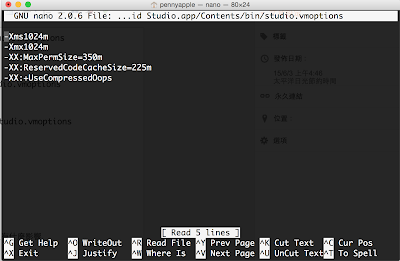
Mac 上的 Android Studio 修改 Heap Size

圖片
路徑在  /Applications/Android\ Studio.app/bin/studio.vmoptions 先打開Terminal 輸入 nano  /Applications/Android\ Studio.app/bin/studio.vmoptions 或是 open -e  /Applications/Android\ Studio.app/bin/studio.vmoptions 內容大概是 -Xms128m -Xmx750m -XX:MaxPermSize=350m -XX:ReservedCodeCacheSize=64m -XX:+UseCodeCacheFlushing -XX:+UseCompressedOops 建議修改 -Xmx750m --> -Xmx1024m 即可,自己測試調整-Xms沒有什麼影響

Ubuntu postgresql remote connection refused 無法遠端連線

安裝完後Nat設定也確認過了 應該沒有問題才對,local端測試也可以順利連入,就是遠端不行 一直以為是pb_hba.conf的問題 原來是postgresql.conf需要修改 我安裝的事9.3版本,因此執行 sudo nano /etc/postgresql/9.3/main/postgresql.conf 把下面這行修改一下 listen_addressed = '*' 終於可以正確使用了

PHP Warning: PHP Startup: Unable to load dynamic library 'C:/AppServ\php5\ext\php_exif.dll' - 找不到指定的模組。

因為想要用排程執行PHP,但是執行php.exe的時候卻發生了 PHP Warning: PHP Startup: Unable to load dynamic library 'C:/AppServ\php5\ext\php_exif.dll' - 找不到指定的模組。 這樣的問題 Google一下後發現原來只要在php.ini將 php_mbstring.dll 的順序放在 php_exif.dll前面就行了 因為php_exif.dll需要使用到php_mbstring.dll

iOS Developer Enterprise Program 申請記錄

圖片
帳號申請流程 申請網址 https://developer.apple.com/programs/ios/enterprise/ 賬面上是USD: 299元,實際申請為NT: 9800元 大概的流程表如下圖 D-U-N-S Number(鄧白氏編碼) 申請時會要求輸入D-U-N-S Number,台灣是用統編辨別公司行號,而蘋果則是要看D-U-N-S Number。 先到 https://developer.apple.com/ios/enroll/dunsLookupForm.action 註冊公司資訊,公司欄位請記得要填寫 Co.,Ltd.或Inc.,自己申請時忘了填寫結果鄧白氏的客服人員打電話來確認後請我再重新申請,7天內台灣客服就會打電話來,客服會提醒認證後14天才會進蘋果的資料庫,再回到申請網頁中去填寫D-U-N-S Number就可以繼續申請流程了. 在Reivew階段蘋果會與您聯繫,也會撥打電話確認,會問幾個問題,主要是問使用的用途,問題大概是公司內部使用以及客戶展示使用,給客戶使用時會在一旁說明(大概的問題,詳細的問題內容已經忘了),之後很快就會發送確認信然後又可以繼續下去了.

Mac HomeBrew 安裝 subversion時出現 #include ... 錯誤

使用HomeBrew安裝Subversion時 brew install --universal --java subversion 卻發生error #include          ^ 1 error generated. scons: *** [context.o] Error 1 scons: building terminated because of errors. READ THIS: https://github.com/mxcl/homebrew/wiki/troubleshooting 應該是因為升級Marvericks的原因 Google了一下 發現安裝  Mavericks Command Line Tools  就好了

Ubuntu vsftpd 使用/var/www/權限

登入使用者帳號後 sudo chown -R ftpadmin /var/www  sudo chmod -R 777 /var/www

Visual Studio 應用程式以系統管理員身份執行

方法是修改這個檔案 app.manifest的內容 如果沒有的話請先建立好 然後讓設定的內容變成  < requestedPrivileges xmlns = " urn:schemas-microsoft-com:asm.v3 " >      < requestedExecutionLevel level = " requireAdministrator " uiAccess = " false " />  </ requestedPrivileges >

手動安裝PostgresSQL and PostGIS on Windows Server

最近安裝PostgresSQL在 Windows Server 時遇到一種狀況 就是用intaller一直無法安裝 所以乾脆就採取手動安裝 先到官網指定網誌下載zip檔案 ( http://www.enterprisedb.com/products-services-training/pgbindownload ) 下載後放到你想放的資料夾 先指定data資料夾(可自行建立指定),可參考下列網址 http://www.petrikainulainen.net/programming/tips-and-tricks/installing-postgresql-9-1-to-windows-7-from-the-binary-zip-distribution/ initdb -U postgres -A password -E utf8 -W -D POSTGRESQL_ROOT\data 註冊Windows Service參考下列討論 http://stackoverflow.com/questions/14484652/register-and-run-postgresql-9-0-as-windows-service pg_ctl.exe register -N postgres -U some_windows_username -P windows_password -D "D:/Program Files/PostgreSQL/9.0.4/db_data" ... 至於PostGIS就懶得自己安裝了 下載安裝檔 http://download.osgeo.org/postgis/windows/pg84/

PGRouting找最近點與最近的線

在PostGIS裏頭要做Routing當然就是用pgRouting 提供一系列的function來做routing 但在做routing的時候總不可能都是由路網上面的點或線當作起始點(線) 因次需要找到最近的點或線來當作routing的起始點 原本都要自己下sql找到最近的起始點或線 有人其實已經整理出來方便的做法 http://underdark.wordpress.com/2011/10/11/a-look-at-pgrouting-find_node_by_nearest_link_within_distance/ 感謝大大無私分享

PostgresSQL 9.1 byte array 變兩倍大

原本將圖示存到PostgresSQL 用Jdbc讀出來後發現byte [] 的length變成兩倍大 http://stackoverflow.com/questions/6181524/getting-nearly-double-the-length-when-reading-byte-from-postgres-with-jpa 結果原來是jdbc driver更新就好了 因為原本是PostgresSQL 8.x,太久沒更新driver了 有空真的要記得常更新 要不然一次更新很多,問題也會很多

Tomcat Crash with Geoserver

Geoserver發佈在windows server上常常有問題 有的時候換個JVM版本就沒問題,有的時候JVM用32bit就OK,有的時候JRE要用JDK裡面的JRE才沒問題... 最近發佈上遇到一個狀況,網路上查了一下似乎是老問題,但也不知道為什麼有的機器上不會遇到,log的紀錄如下 # # A fatal error has been detected by the Java Runtime Environment: # #  EXCEPTION_ACCESS_VIOLATION (0xc0000005) at pc=0x00000001800057b2, pid=7836, tid=6024 # # JRE version: 6.0_35-b10 # Java VM: Java HotSpot(TM) 64-Bit Server VM (20.10-b01 mixed mode windows-amd64 compressed oops) # Problematic frame: # C  [tcnative-1.dll+0x57b2] # # An error report file with more information is saved as: # D:\apache-tomcat-7.0.37_80_tomcat\bin\hs_err_pid7836.log # # If you would like to submit a bug report, please visit: #   http://java.sun.com/webapps/bugreport/crash.jsp # The crash happened outside the Java Virtual Machine in native code. # See problematic frame for where to report the bug. # 目前是根據 http://osgeo-org.1560.n6.nabble.com/Geoserver-crashes-td3804238.html 將 /bin下的tcnative-1.dll拿掉解決,感謝上帝~~

Virtual Box 安裝 Asterisk Now 記事

說明 在vm上安裝asterisk now 有實體IP 機器設定local ip放在nat後面 Virtual Box安裝 VM選則 linux -> other 來安裝 中間會卡住在下面訊息的地方 NET: Registered protocol family 2 要去主機板設定把 Enable IO APIC 給打勾才行 網路設定 設定為Bridge綁定網卡 Cent OS 帳號root 密碼your_passwrod Nat設定 UDP/5060 -> Forward to 192.168.x.x UDP/10001-20000 -> Forward to 192.168.x.x FreePBX設定 到/etc/asterisk nano sip_nat.conf 設定(參考 http://blog.iwayvietnam.com/tuanta/2010/03/10/howto-setup-asteriskfreepbx-behind-nat ) externip=24.72.182.16 localnet=192.168.1.0/255.255.255.0